
Browse docs
First Setup
Complete Installation, then work through these steps. Use one organization for your first test.
Your first goal is simple: a regular member can open the organization's facilities, complete one heist and one drug route, and receive the rewards.
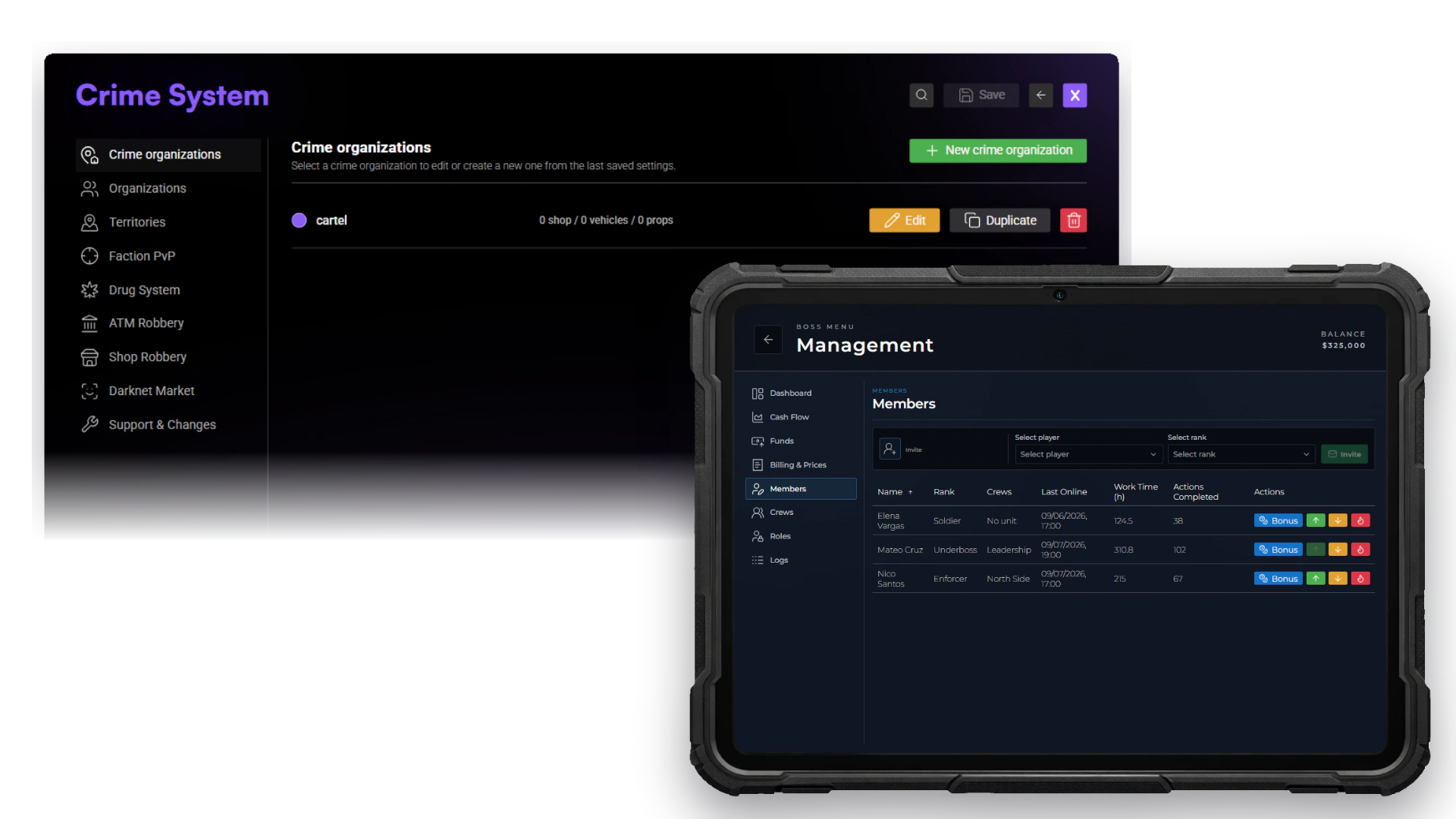
The left interface is used by administrators to define the organization. The tablet is used by authorized leaders and members during normal gameplay.
Have these ready
- Your administrator can open
/jobconfig,/drugcreator, and/heistcreator. - You have chosen an organization name and leader grade.
- A regular player is available to test membership and access.
Set up your first organization
Choose how players join an organization
Open /jobconfig → Crime System → Organizations → Membership and find Organization membership model.
| Choice | What it means |
|---|---|
| Framework job / gang | Membership comes from the player's framework job on ESX, or gang on QBCore/Qbox |
| Independent organization | Players join a separate Crime organization and can keep their normal framework job |
Framework job / gang is the default. Use the exact job or gang name that exists on your server.
On QBCore, define the matching gang and ranks in qb-core/shared/gangs.lua; on Qbox, create it in qbx_core first. A job with the same name is not enough. The included organization is named cartel; replace or configure it for your server.
You can select Independent organization directly. Its ranks are initially copied from the matching framework definition when available; otherwise it starts with Member (0) and Leader (1). Independent ranks are saved separately. Changing the model migrates existing memberships, so do not switch an established server merely to add one player.
Check: you know whether membership will come from the framework or from Crime's own organization system.
Configure the organization
Open Jobs, create an entry or select the supplied cartel, and check General. The Job name is the internal membership name, such as cartel; the label is the name players see. Check the Society account used for the organization's shared money. Configure shop stock and vehicles in Shop and Vehicles when needed.
The supplied cartel example uses society_cartel as its organization account. Make sure your banking setup supports the account you select.
Crime organization access does not require the ordinary job duty switch. A member needs to belong to the correct organization. An on-duty registered Sky job takes priority; going off duty restores Crime access. An ordinary civilian framework job does not suppress gang access.
Save your changes before moving on.
Check: the organization is listed with the intended name and account.
Set up the leader
With current Sky Jobs Base, use /setcrimeboss <organization> <playerId> to assign the connected first leader. For example, /setcrimeboss cartel 12 assigns player 12 to cartel at its highest configured rank. It supports both membership models; an independent organization does not require a temporary framework job.
On QBCore/Qbox this updates Crime gang membership while retaining the ordinary job. For ESX framework-job membership, the target must already belong to that organization or be unemployed; the command refuses to replace an unrelated regular job.
Run /crimejobtest <playerId> and verify the organization, rank, and management permissions. /setboss <job> <grade> is for ordinary job-grade permissions and rejects Crime organizations.
If upgrading a QBCore setup that used a normal Crime job, define the matching gang and assign its members explicitly. A same-named job no longer supplies gang membership. Restore each player's intended normal job if necessary.
Once management access is placed in the next step, the leader can invite further members and set grade permissions there. See Permissions and Gangs and Membership.
Check: /crimejobtest recognizes the leader's organization and grade and shows management permission. If the organization is wrong, check the assignment before changing individual permissions.
Place the facilities
Open /jobconfig → Crime System → Jobs, select the organization, then open Locations → Add. Choose a location type, select Set on its new row, and follow the placement prompt. Wait for the saved confirmation. Add the facilities you want members to use:
- Management and tablet access.
- Storage and lockers.
- Wardrobe and garage.
- Heist crafting (Use heist workshop) and equipment storage (Open heist storage).
Place each point inside the correct building and assign it to the correct organization. Add vehicles or shop stock where needed; placing an interaction alone does not fill its catalog.
For a heist planning board, an authorized organization member uses /heistplanning and follows the placement prompt. The heist_planning_table item is an alternative way to begin placement.
Check: the regular member can reach and use each intended point. Private storage must remain unavailable to unrelated players.
Make equipment obtainable
Check Inventory Items. Players need a way to obtain their tools, materials, seeds, and packaging through your shops or gameplay.
Also check the payout accounts. Drug sales use black_money by default. For QBCore servers using marked bills, set black_money_mode = "markedbills" in sky_base/config/framework/qb.lua. Each unique markedbills bag carries its value in info.worth; the bridge sums this value and preserves the remaining worth on partial spending. Keep "account" for an account-based setup. This setting concerns personal money, not the organization society account.
Check: the player can actually obtain the supplies. An item appearing in the inventory's item list does not mean a shop sells it.
Test one heist
Follow Your First Heist. It explains the included Fleeca robbery and exactly what the crew needs.
Test from preparation through collecting the reward. A completed preparation and a tool in the player's inventory are not always the same thing.
Check: the crew can start the heist, use its equipment, collect the loot, and receive the payout.
Test one drug route
Follow Drug Basics and First Setup.
Have a regular player obtain materials, process them, collect the finished product, and sell it. Add owned labs, workers, or campers after that first route works.
Check: after a successful sale, the sold items leave the player's inventory and the configured account receives the payment.
Before inviting everyone
Check that a regular member can access the intended facilities, complete both activities, and receive the correct rewards. Check that unrelated players cannot use private facilities.
After a planned restart, confirm that your settings and the player's saved progress remain. If something fails, start with Troubleshooting.
Add the remaining systems after this foundation passes:
- Configure a Mainbase before enabling Base Raids.
- Review safety, placement, dispatch and moderation before opening Interrogation.
- Balance personal Crime Reputation separately from territory influence and Drug producer reputation.
- Test BlackBay, Faction PvP, and the Drug Tablet Apps with normal members.