
Browse docs
Gangs and Membership
What players can do
A Crime organization gives players a shared group for heists, territories, and faction events. Members can also use the storage, vehicles, shops, and tablet apps you provide.
Start with one organization and two test players: a leader and a regular member. Follow First Setup if you have not installed and configured the resource yet.
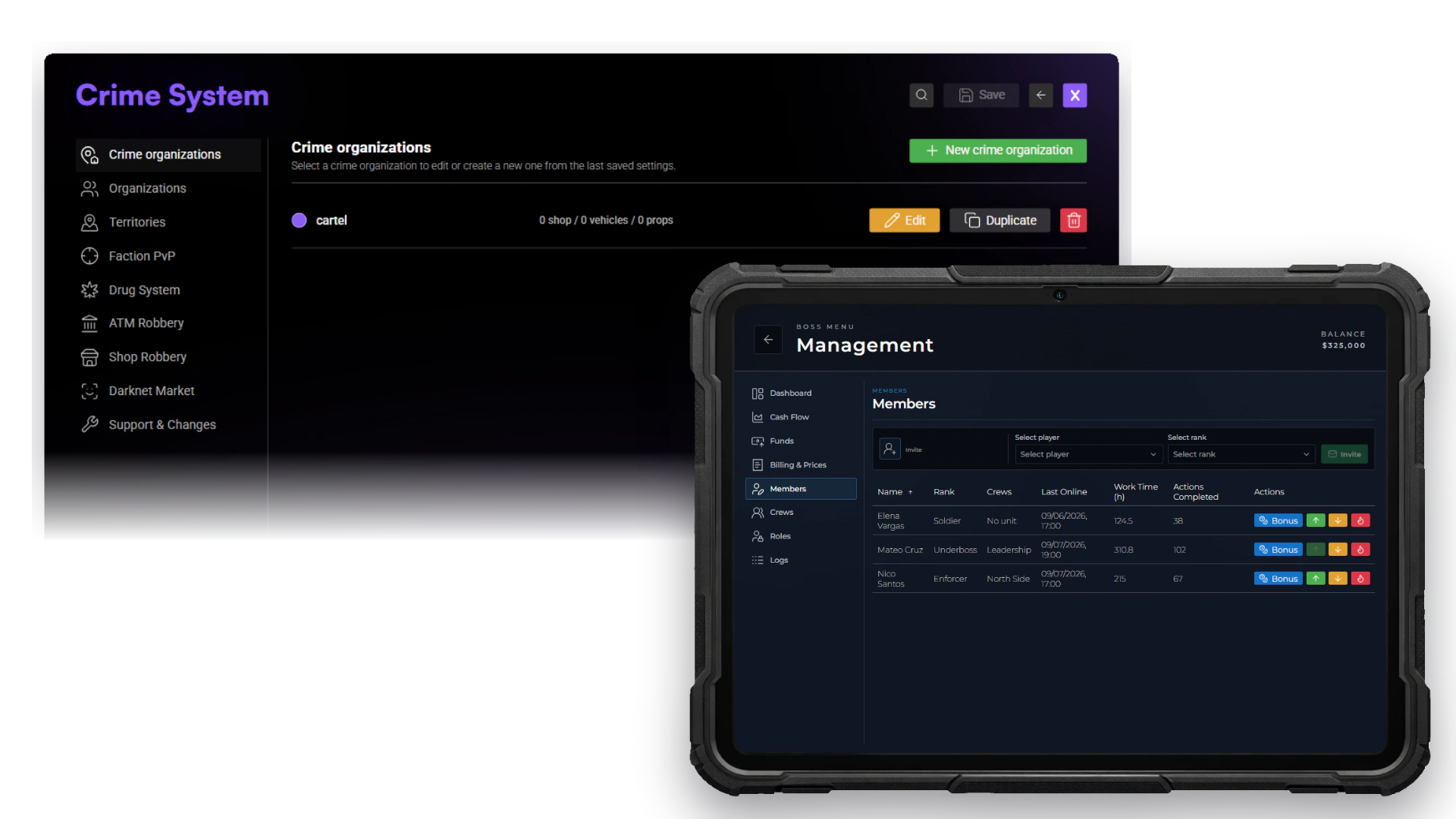
Administrators define identity, membership and facilities in Crime configuration. Authorized leaders manage the resulting member roster through the shared organization tablet.
Choose how players join
Open /jobconfig → Crime System → Organizations → Membership and choose the organization membership model.
| Choice | What it means for your server |
|---|---|
| Framework job / gang | Crime membership follows a framework job on ESX, or a gang on QBCore/Qbox. |
| Independent organization | Players join a Crime organization while keeping their normal job. |
The default is Framework job / gang. On QBCore, define the gang in qb-core/shared/gangs.lua; on Qbox, create it in qbx_core first; a job with the same name is not enough.
Independent membership can be selected directly. Follow First Setup to assign the connected first leader with /setcrimeboss <organization> <playerId>. Changing the model migrates existing memberships. Back up your database and check both organization access and normal employment afterward.
After switching from framework jobs to independent membership, check each player's ordinary job and assign the intended job if needed. Crime membership and rank are now stored separately.
Set up your first organization
Create the organization
In /jobconfig → Crime System, edit the supplied cartel organization or create your own. Set its name, label, color, and organization account. With framework membership, its name must match the framework job or gang exactly.
Prepare the leader
Complete the leader assignment in First Setup. Give that rank member-management permission and, if intended, finance permission. Use Permissions to choose what regular members may do.
Provide the shared facilities
Place a management location so the leader can manage recruitment. Add the storage, garage, or shop locations you want members to use, with their vehicles and shop items. Placing a shop or garage does not fill its catalog automatically. Save your configurator changes before testing these facilities.
Invite the second player
Stand near the online recruit. As the leader, open Management → Members, select the player and their starting rank, then choose Send invite. The recruit must accept the invitation.
The recruit cannot already belong to another Crime organization. For framework job membership, they must be unemployed; for QBCore/Qbox gang membership, they must have no gang. Independent members can keep their regular job.
Check access
Open the shared tablet with both players and check that the intended Crime apps appear. Reconnect the recruited player and check the member list again.
Put money in the right account
Paid faction registration and event prize funding use organization funds. A leader's personal bank balance does not cover those charges automatically.
BlackBay has a separate personal coin wallet for each player. Its trades do not use the organization balance. Money Wash is unavailable in the current release.
Quick test
- The leader and regular member can use the facilities intended for them.
- The accepted recruit appears in Management → Members with the chosen rank.
- A non-member cannot use private organization facilities.
- Only the chosen roles can manage members or spend organization funds.
- Membership and access still work after reconnecting.
If access is wrong, an administrator can run /crimejobtest <player ID> to see which Crime organization and permissions the player actually has.