
Browse docs
Laboratories and Production
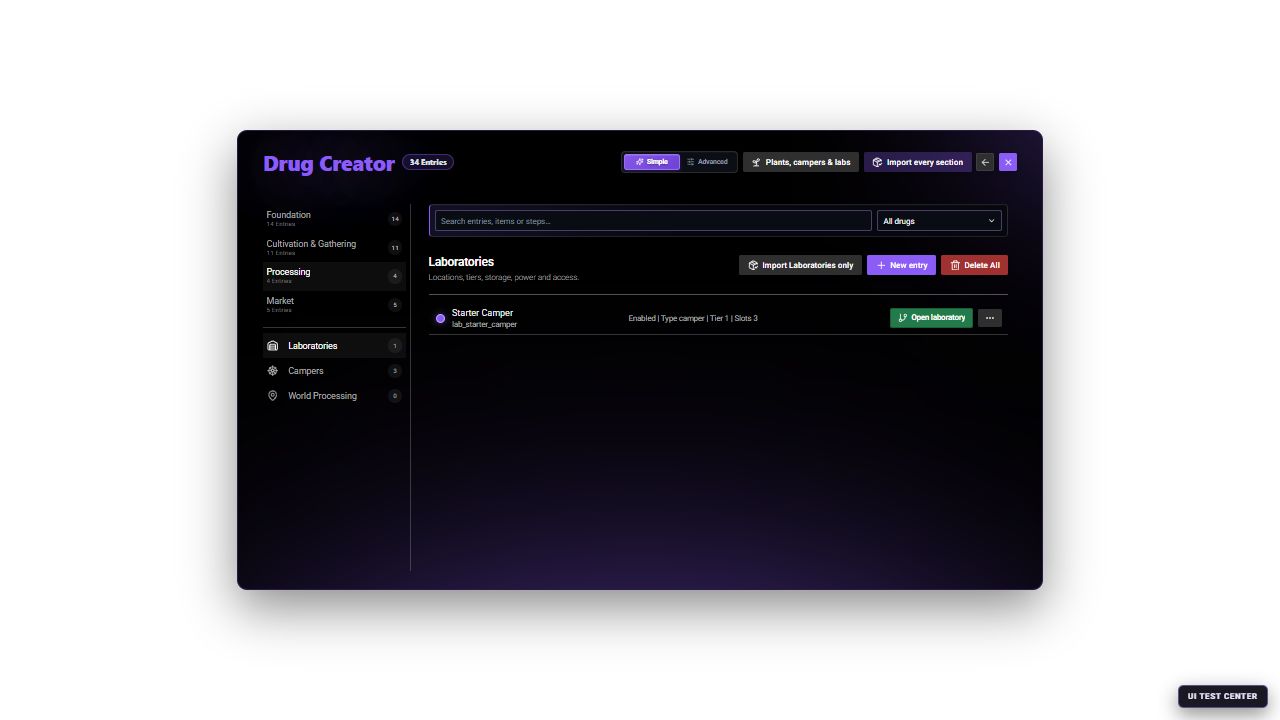
Laboratory definitions connect the purchase, interior, access, capacity and equipment contracts used by the player-facing manager.
Choose how players should produce goods
At public processing points, players bring materials and complete a recipe. In owned laboratories, they also manage equipment, storage, power, and staff.
For your first server setup, use the public route in Overview and First Setup. Add owned labs once that works.
Set up a public processing point
Open /drugcreator → Processing → World Processing, then create or edit a location.
Assign the recipe
In Process assignment, select the Assigned recipe and choose Direct processing.
Place the interaction
In World presentation, choose the table or NPC and its interaction options. Set its location under Positions.
Verify the recipe contract
Open the assigned recipe in Foundation → Processes. Check Recipe and result for materials and output, then Process Steps for actions and tools.
Supply every requirement
Make those materials and tools obtainable through Market → Labor suppliers or your own shop.
Test as a normal player
Save and test the point. It must offer the selected recipe, accept its materials, and let the player collect the finished item.
A recipe is the instruction for making an item. The processing location is where players perform it. Both must be configured. A world processing location stores one recipeId; create another location when you want another recipe at a separate point.
The recipe screen lists required materials and tools. Materials are taken when production starts.
An onsite point can be busy while another order occupies it. Finish and collect that order before starting another.
Set up a laboratory for purchase
Open Processing → Laboratories. For a first test, use Hidden Basement (lab_hidden_basement).
Select the interior
In Interior and tier, select the interior and starting installation places. The interior template provides the room layout and equipment nodes.
Configure access
In Access and security, check the entrance presentation and lock settings. Use Set position to place the entrance.
Set capacity
In Capacity and limits, check the allowed equipment tier and storage limits.
Set purchase rules
In Purchase and ownership, configure price, payment account, and personal or faction purchases.
Complete a real purchase test
Save, visit the entrance as a normal player, and complete a purchase. Test entry and exit with your map resources running.
The supplied Hidden Basement charges the player's black_money account. Other properties can charge a different account; check each entry. Faction purchases use faction funds and require the appropriate faction authority.
If the property's acquisition screen also offers rental, test the initial charge and lease renewal separately from a purchase.
What players do after buying a lab
A newly purchased laboratory starts empty. Buying the room does not provide all the machinery or supplies.
Players use the laboratory's setup guide to:
- Put money into its treasury, which is the lab's operating balance.
- Arrange storage.
- Install power where the room supports it.
- Install the machines or growing equipment they need.
- Add supplies and start production.
The default management command is /druglab. Players still need permission to manage the lab.
Provide equipment, maintenance supplies, packaging, and tools through a supplier or shop.
Put supplies in the right inventory
For the supplied recipes, direct processing uses the materials and tools in the player's inventory.
A queued laboratory order uses the lab's Storage. Players must deposit its ingredients and required tools there, then open Production, select the recipe and an available worker, and review the requirements and cost. The lab treasury pays that cost. Creating an order reserves its ingredients, so they are no longer available for another order.
For example, the shipped Process weed recipe needs one raw_weed and one empty_baggy in lab storage, plus an installed packaging table and an available worker. Carrying those materials in a pocket is not enough for that order.
Match the machines to the recipes
A recipe may need more than one machine. For example:
| Shipped starter recipe | Input and machine needed in an owned lab |
|---|---|
| Process weed | raw_weed + empty_baggy; Packaging Table |
| Prepare coca material | coca_leaf + lab_supply_kit; Chemistry Table; lab_gloves tool |
| Pack coke portions | coke_powder + empty_baggy; Packaging Table; digital_scale tool |
Check every recipe's Process Steps and choose the matching equipment from Foundation → Equipment. The equipment entry defines what a machine can do; players still need to obtain and install that machine in their lab. Similar-looking tables may have different functions.
The larger catalog also contains recipes such as drying and curing weed. They are not part of the small starter selection. Import or create them deliberately and give every recipe its own compatible location or lab equipment.
raw_weed and empty_baggy, install a Packaging Table, assign an available worker, fund the treasury, and start Process weed.Before adding more machines, check power demand and available space. An overloaded or poorly maintained lab may be unable to start production.
Access, upkeep, and workers
Give trusted members the role they need. Permission to enter is different from permission to take stock, install equipment, hire workers, or manage keys.
Test with the owner and a second player. Administrators may bypass restrictions.
Players must maintain equipment and keep fuel and oil available where required. The supplied generators use fuel_can, machine_oil, and repair_kit. Rent, cleanliness, storage, and heat also need attention.
Workers and queued production are optional next steps. Provide suitable workers for the intended job and account for their wages. If an order stops, check its displayed requirements, supplies, machines, staff, funds, and power before changing timers.
Optional: a handoff service
A handoff point lets players leave their main material with an NPC and return for the finished goods later.
In Processing → World Processing → Process assignment, select Delayed handoff processing and set the service fee and payment account. Open Delayed handoff to set the waiting time, risk, and active-order limit.
The service provides the extra materials and tools. Include their cost in your fee. Players must collect finished orders; uncollected orders use capacity.
Test by handing over only the recipe's main input item and paying the fee. Return after the displayed waiting time and collect the result.
Test before selling labs to players
Acquire a test lab as a normal player, buy its supplies, install the required machines, and complete one recipe. Check access with a second player and verify that stock, ownership, and installed equipment remain after a planned restart.
For a vehicle-based alternative, see Campers and Mobile Labs. For the exact creation order of interiors, equipment, facilities and suppliers, use Creator Workflows. For exact starter recipes and supplier stock, see Default Data and Items.