
Browse docs
Growing and Harvesting
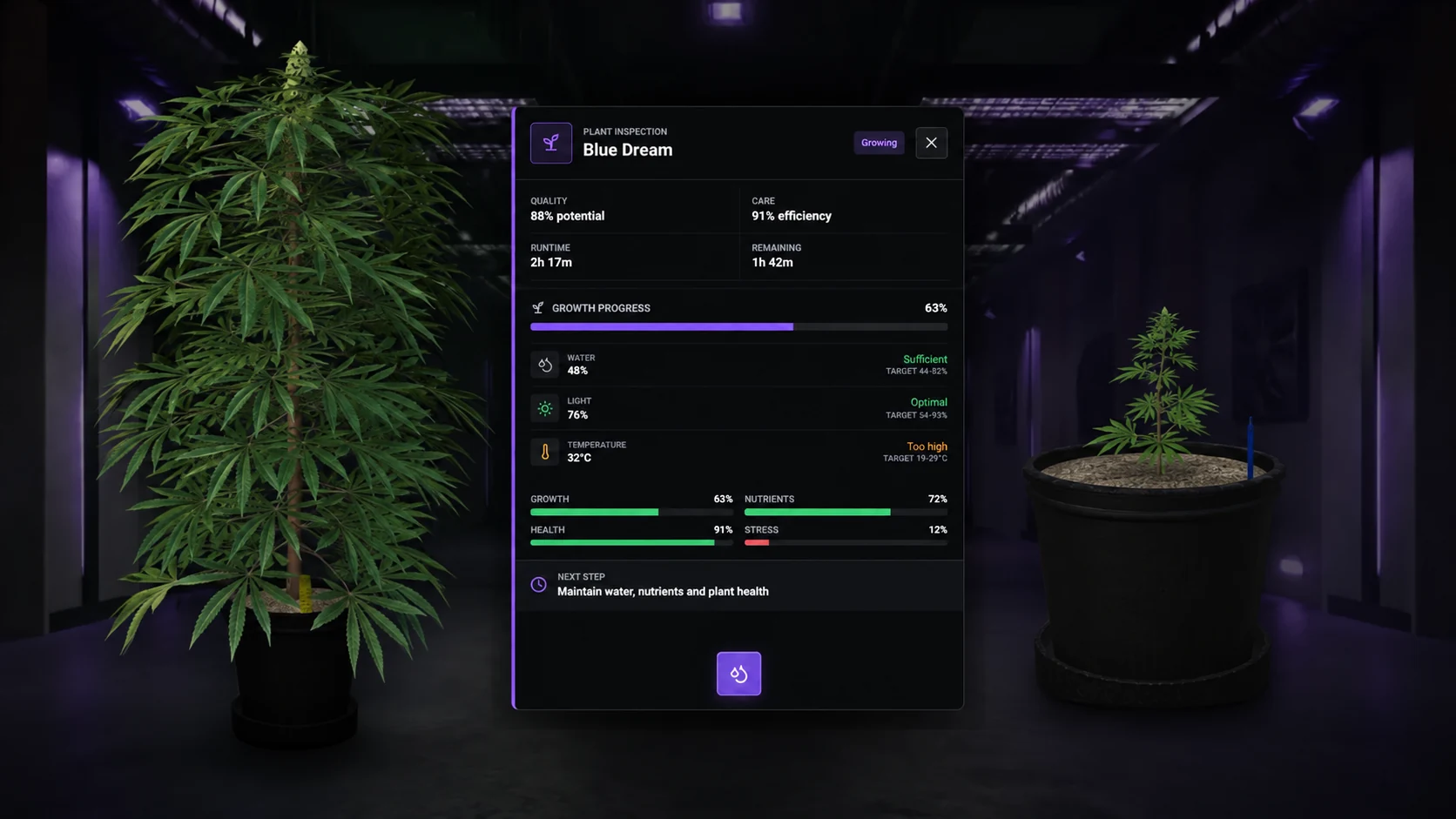
Cultivation is a timed lifecycle. Seed, environment, care, tools and inventory space all have to agree before the final harvest succeeds.
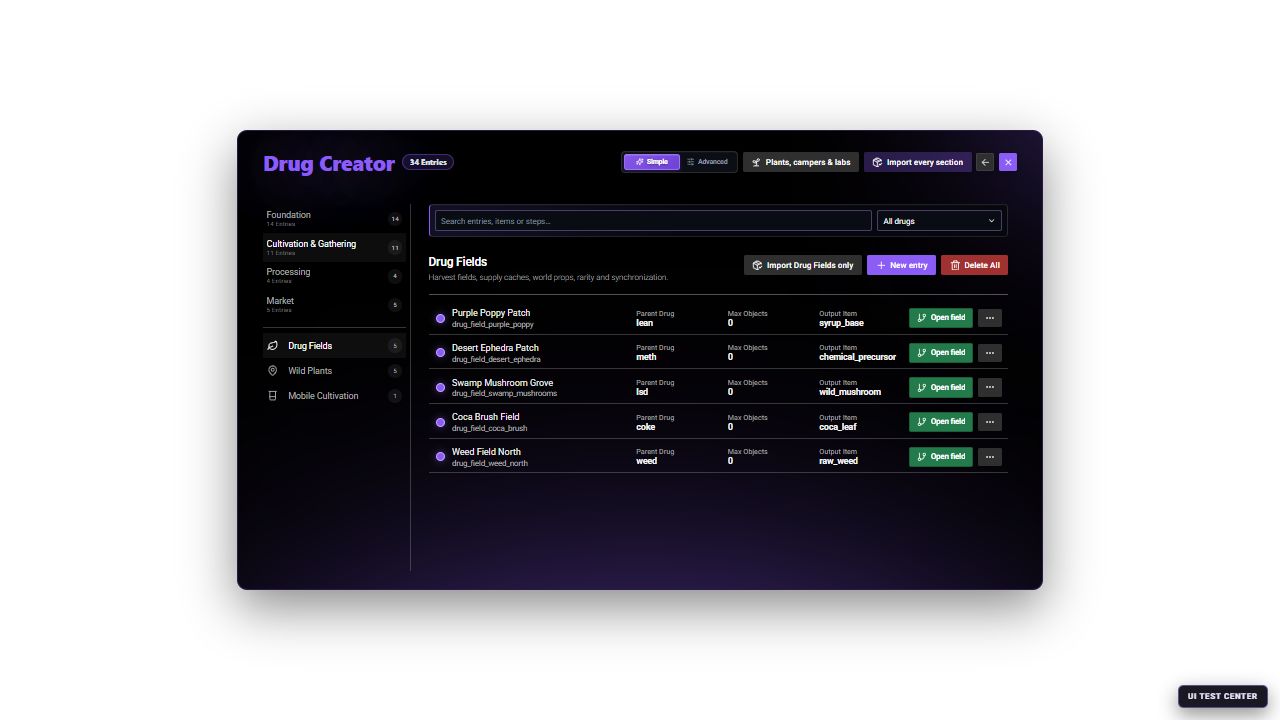
The Drug Fields catalog shows whether an entry is enabled, its linked drug, object count, radius and average respawn behavior before you open the editor.
What players can do
Players can collect materials from public fields, discover wild plants, or grow their own plants.
| Option | Player experience |
|---|---|
| Public field | Visit an area and harvest the available plants |
| Wild plants | Explore configured areas and discover plants or seeds |
| Own cultivation | Prepare a pot, plant a seed, care for the plant, and harvest it |
Public fields are an accessible starting point. Cultivation adds investment and upkeep.
Set up a first plant
In /jobconfig → Crime System, check Growing → Growing Enabled. To let players plant outside a lab, also enable Runtime Access → Outdoor Planting. Indoor growing needs a suitable laboratory and access.
Open /drugcreator → Foundation → Strains → Blue Dream → Parent and seed. Check Seed Item (blue_dream_seed) and Required cultivation level. Keep the supplied starting strain enabled.
Provide these basic supplies:
| Item | Use |
|---|---|
plant_pot | Basic pot |
potting_soil | Fill the pot |
plant_nutrients | Initial nutrients and later care |
water_bottle | Water the plant |
blue_dream_seed, or your selected strain's seed | Start the plant |
trimming_shears | Default weed harvest tool |
plant_medicine | Treat plants when needed |
Use the exact item names from your saved entries. A strain's name is not necessarily its seed's item name.
Make the supplies available in Market → Labor suppliers → Supplier products or your own inventory shop. Test the actual purchase price, payment account, and stock with a new player.
Explain the planting steps to players
The normal flow is:
Place the pot
Use plant_pot from the inventory and confirm its position.
Prepare the soil
Stand near the empty pot, use potting_soil, and add plant_nutrients.
Plant the seed
Use blue_dream_seed at the prepared pot and complete the planting interaction.
Maintain the plant
Check its condition through the plant interaction. Water it and provide care when needed.
Harvest the result
Wait until the harvest action is available and carry the configured tool.
The default setup consumes the pot, soil, initial nutrients, and seed. Players need to buy replacements for their next plant.
An empty pot does not grow. When a player reports no progress, first check whether every preparation step was completed.
Growth and plant care
Water, nutrients, light, temperature, airflow, and plant health affect progress. Plants can also suffer from stress, pests, or mold.
Players should keep conditions within the plant's suitable ranges.
Growth updates every five minutes by default. In Foundation → Strains → Growth and genetics, Base duration (minutes) and Growth Speed control the intended pace. Poor conditions can make the plant take longer; wait for a growth update before deciding that it is stuck.
For indoor plants, provide lights, ventilation, and power. Place equipment close enough to cover the growing area.
Starting levels and unlocks
Advanced seeds, pots, soil, or equipment can require cultivation levels.
For your first setup, choose supplies available at the starting level. Test with a new character rather than an experienced grower.
Change a strain's required level under Parent and seed. The unlock levels for pots, soil, and equipment are in Config.Drugs.Growing.progression.unlocks, inside config/drugs_growing.lua.
Configure public fields and wild plants
In /drugcreator → Cultivation & Gathering, choose the relevant section:
- Drug Fields: set the product, output item, quantities, and tool in Harvest output. Use Harvest interaction for the harvesting action and Positions for the location.
- Wild Plants: set the output and possible seeds in Plant and harvest. Use Spawn behavior for plant count, radius, and regrowth time, then Positions for the area.
Save and visit the location as a player.
Check:
- The area is reachable.
- The required tools are obtainable.
- The harvest gives the intended item.
- Rewards and regrowth times suit your economy.
- The interaction prompt or target works.
More plants, larger rewards, and faster regrowth all increase supply. Change one at a time and compare the result with your recipe requirements.
Also decide whether players may harvest someone else's outdoor plants. This is allowed by default. Change Runtime Access → Public Outdoor Harvest in /jobconfig → Crime System if you want to restrict it to the planter.
Create a new public field
Create the output contract
Confirm the target drug and output item already exist. Decide whether the field produces a raw ingredient, seed, tool supply or another recipe input.
Add the field entry
Open Cultivation & Gathering → Drug Fields → New entry. In General, set a unique ID, display name and enabled state.
Configure harvest
In Harvest, select the output items and amounts, collection mode, required tool, prop usage and prop model. In Quality, set the minimum and maximum quality awarded by this source.
Place the area
In Positions, set the center and radius. Use the placement controls while standing at the intended location, then check that every spawned object is reachable.
Decide map visibility
In Advanced mode, Map display controls the blip, radius circle, color, scale and short-range behavior. Leave these disabled for a hidden source.
Save and inspect
Save, reopen the entry and verify its summary row. Visit the field as a normal player with and without the required tool.
Create wild plants instead
Use Wild Plants → New entry when the system should distribute individual plants through an area rather than expose one harvest field.
- Plant and harvest: drug, strain, output item, seed item, rare seed, tool, inventory metadata, plant prop and ground offset.
- Spawn behavior: object count, radius, spawn radius, respawn minutes and interaction distance.
- Positions: the center and heading of the spawn area.
- Advanced risk: rare chance and police alert chance.
Wild plants connect directly to the selected strain and seed flow. A field can distribute arbitrary harvest items; it does not need to represent a planted strain.
Create a pocket recipe
Mobile Cultivation is for a recipe players perform from their inventory without a public world-processing point. It is suitable for actions such as rolling, combining or packing a small product.
Set the input and amount, whether it is consumed, output item and packaging, required tool and whether the tool is consumed. Then configure duration, minigame, scenario, normal/perfect reward, failure risk and quality multiplier. Advanced mode adds explicit batch metadata, quality values, heat and police risk.
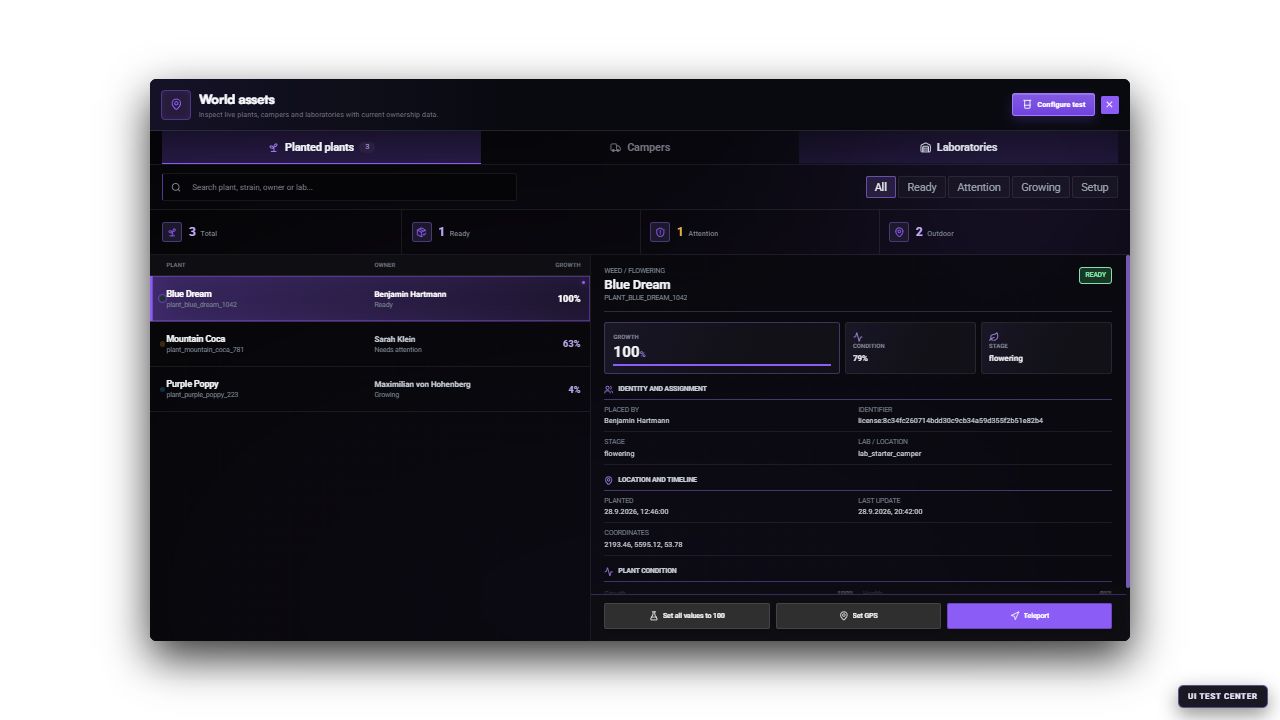
Use Plants, campers & labs at the top of the Creator to inspect live world assets. The manager has separate tabs for planted plants, owned campers and laboratories. It is a diagnostic and test view, not the catalog editor used to define a strain, field, camper or laboratory. Configure test places development test objects; it is not the normal player acquisition flow.
Test the whole growing loop
Use a normal player to buy supplies and plant one seed. Complete every preparation step, observe a growth update, perform a care action, and harvest.
Then take the actual harvested item to its processing recipe. Default weed harvesting produces raw_weed, which must be processed before the standard packaging recipe.
During a planned restart test, check that the plant returns with its saved progress and ownership.
Continue with Laboratories and Production or Overview and First Setup.